 Binbert Technology | Computer | Security | Networking | Mobile
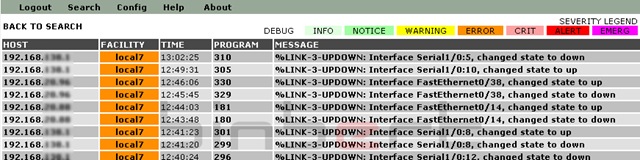
Here is the step by step Installation procedure of a Syslog Server. Here I Used Debian platform. If you are in a different platform please check your file names and path.
1, Install Debian lenny
Download link : http://www.debian.org/releases/stable/
2, Install Following applications
openssh-server
openssh-client
apache2
libapache2-mod-php5
php5-cli
php5-common
php5-cgi
mysql-client
mysql-common
mysql-server
php5-mysql
php5-sqlite
php5-gd
Syslog-NG'
Root@server # apt-get install openssh-server openssh-client apache2 libapache2-mod-php5 php5-cli php5-common php5-cgi mysql-client mysql-common mysql-server php5-mysql php5-sqlite php5-gd phpmyadmin
3, Configure /etc/default/syslog-ng
Root@server # vi /etc/default/syslog-ng
CONSOLE_LOG_LEVEL=1
case "x$KERNEL_RINGBUF_SIZE" in
x[0-9]*)
dmesg -s $KERNEL_RINGBUF_SIZE
;;
x)
;;
*)
echo "KERNEL_RINGBUF_SIZE is of unaccepted value."
;;
4, Configure /etc/syslog-ng/syslog-ng.conf
Find following line and remove the comment
Change  # udp();  to udp();
Change use_dns(no);    to  use_dns(yes);
add dns_cache(yes);
5, Downloaded and extract PHP Syslog NG to /var/www
6, Move Log from /var/log/syslog to MySQL
Add following script to the file
Root@server # vi /etc/syslog-ng/syslog-ng.conf
destination d_mysql {
pipe("/var/log/mysql.pipe"
template("INSERT INTO logs
(host, facility, priority, level, tag, datetime, program, msg)
VALUES ( '$HOST', '$FACILITY', '$PRIORITY', '$LEVEL', '$TAG', '$YEAR-$MONTH-$DAY $HOUR:$MIN:$SEC',
'$PROGRAM', '$MSG' );\n") template-escape(yes));
};
log {
source(s_all);
destination(d_mysql);
};
7, Create a script to run in the start-up
root@Server # vi /etc/syslog-ng/syslog2mysql.sh
#!/bin/bash
if [ ! -e /var/log/mysql.pipe ]
then
mkfifo /var/log/mysql.pipe
fi
while [ -e /var/log/mysql.pipe ]
do
mysql -u root --password=YOUR_PASS syslog < /var/log/mysql.pipe >/dev/null
done
8, Give execute permission to /etc/syslog-ng/syslog2mysql.sh
root@Server# chmod +x syslog2mysql.sh
9, Put this script to Startup
Create file /etc/rc2.d/S99syslog2mysql
And add following line in that file
/etc/syslog-ng/syslog2mysql.sh
Now run following command to make it as executable
root@Server# chmod +x /etc/rc2.d/S99syslog2mysql
10, Create a Database named SYSLOG
root@Server # mysql -uroot -p syslog /var/www/install/sql/dbsetup.sql
Give write access for file /var/www/config/config.php
root@Server # chmod 777 config/config.php
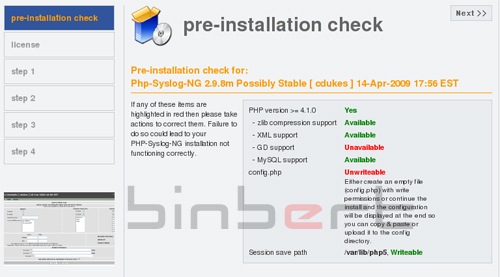
Now we have too configure the PHP syslog ng, for that access your server via web browser ( http://youripaddress/install/install.php ) and follow the steps. after the installation you can access your server via web ( http://youripaddress/ )

This command does not work: mysql -uroot -password=YOURPASS syslog </var/log/mysql.pipe> /dev/null
I receive the following error: ERROR 1064 (42000) at line 1: You have an error in your SQL syntax; check the manual that corresponds to your MySQL server version for the right syntax to use near ‘NTO logs (host, facility, priority, level, tag, datetime, program, msg) VALUES (‘ at line 1
Any assistance would be great.
Thanks,
Tom
@tom
That is a command inside a script “/etc/syslog-ng/syslog2mysql.sh”
Hope you replaced SQL user name and password in that line.
here user is “root” and password is “YOUR_PASS”
Dear All,
How to configure in syslog server to get log from cisco router, switch, and windows?
BR,
khemarin
Dear Sir,
This topic is very helpful. but with the step it was error
CEMDB: MySQL Dump Import
It works!
This is the default web page for this server.
The web server software is running but no content has been added, yet.
Please kindly guide me!
BR,
Khemarin
You can install / configure syslog server using above document. to redirect your logs from different devices like switches and routers you have to configure the client devices.
Commands to enable logging cisco events (192.168.0.1 is the syslog server ip address )
Router(config)# logging on
Router(config)# logging 192.168.0.1
@Khemarin
If it is still showing “It works!” message if your browser, it means the file index,html is still in the /var/www
replace the file and redo the 5th step, remember your files should be extracted to the /var/www (not in subfolders)
I have finished all the steps provided and configured a few Cisco switches to point to the Syslog server, however when i login all i get is:
USING TABLE: logs
There appear to be no hosts in the Database yet
You can generate fake ones using scripts/dbgen.pl
Can you help with this problem? I don’t know how to add hosts to the database.
log line source(s_all); line not work, because syslog-ng looking source s_src, but I done source(s_src).
it works!.