 Binbert Technology | Computer | Security | Networking | Mobile
Most of the applications are using standard ports, some cases user or application will assign different ports for the application. For example Port 80 is the default port for IIS, if you are trying to start a different web applications it will say error message like “port 80 already in use” . Or you start the third-party web application before IIS starts. IIS will give errors. skype and XAMPP Port conflict is the main example for that.
In these situations we have to find out which application is running on a particular port. Here is the step by step to find out this.
First identify the listening ports in your Server
Go to command prompt and type
Netstat –ano | find “0.0.0.0”
You can see the list here
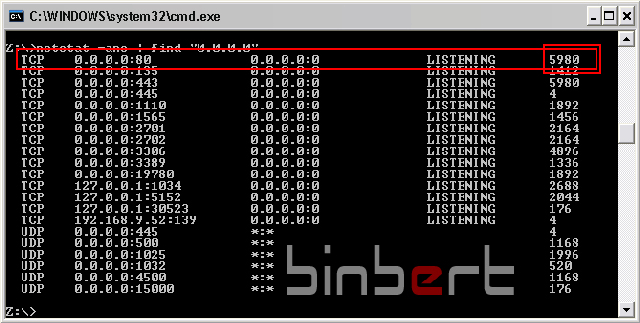
Find out the corresponding Process ID from the line
Now open the task manager
Go to “View” and “Select Columns”
Put a Tick mark on “PID (Process identifier)”
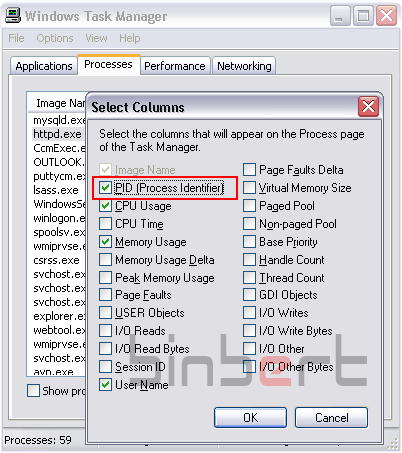
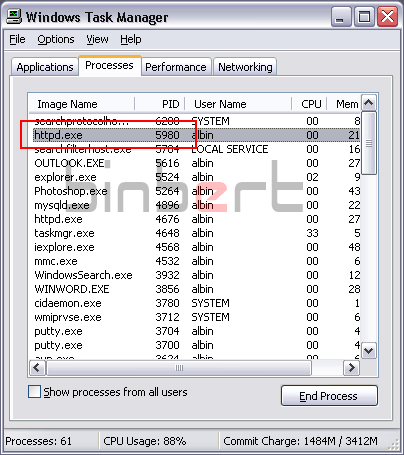
Now you can see the application with process ID.
Here Port 80 is used by Apache ( httpd.exe )




Nice tip
Can also use ‘netstat -anob’ to show the executable name (doesn’t work with the ‘| find 0.0.0.0’ suffix though because the executable name is displayed on a separate line)..
Thanks, very usefull tip
Hi @Matt
Thanks for your contribution; it is easier than above steps. Looking forward for your valuable comment in future also
[…] our previous article we explained the steps for windows. Here you can find the steps to identify the service running in […]
could you please advise how to do the same for Linux…
Hi @ Jivin
Please read my latest post about linux http://binbert.com/blog/?p=484
netstat -anob is really good to find this
thank you , it really worked and i was able to find what service was bound to port 80
when i typed the command in the command prompt,i get the reply ‘Netstat’ is not recognised as an internal or external command,operable in a batch file.Please some one should help me as i really need Apache to run
When I did netstat i see that port 80 has PID 1592. I am not able to find the 1592 in PID in task manager. That is so weird.
I am not able find what is using port 80 causing issues for me to run tomcat server.
Please advise.
Are you checking process from all users. you can see a tick mark in task manager “Show process from all users” This may help you.